
Paper Trading: How to Practice Trading Without Risking Money
Paper trading lets you practice trading with virtual funds. Learn how it works, how to start, what to track, its limits, and our paper trading challenge.
Key takeaways
- Paper trading means placing simulated trades with virtual funds, so you can practice order entry, position sizing and reviewing results without risking money.
- The SEC states that day traders typically suffer severe financial losses in their first months of trading, and many never graduate to profit-making status.
- An updated SEBI study found that 93% of individual traders incurred losses in equity F&O between FY22 and FY24.
- A paper account cannot reproduce live fills or loss aversion, so paper results do not show how you will trade with your own money.
- Our Paper Trading Challenge awards Bloom Points for executed paper trades and ranks the top 100 each week on a leaderboard, with no live funds involved.
Paper trading means placing simulated trades with virtual funds, in conditions that follow the live market, so you can practice without risking money. It uses the same steps as a live trade: you choose an asset, enter an order, and follow the position until you close it. The difference is that no real money is used, so an error costs you time to review it and nothing more.
This guide covers how paper trading works, how to run a practice routine with written rules, what to track to measure progress, what paper trading leaves out, and how our Paper Trading Challenge works. To see the assets involved, you can browse the markets on Bloom, where stocks, ETFs and crypto assets are listed with their prices and 24-hour changes.
#What is paper trading
Paper trading is the practice of placing trades in a simulated account instead of a live one. TradingView's help center describes paper trading as demo trading with no deposits and no real money involved, tested in close-to-real market conditions. The same page says it lets you practice buying and selling assets using simulated money. TradingView also states that its system tracks your orders and positions in real time, so you can evaluate the profitability of a strategy.
Virtual funds are that simulated money. They form a practice balance that exists only inside the simulator and is not real money, so a paper account can gain or lose value without any effect on your own savings.
The term paper trading describes trades that are recorded rather than executed in a market. Each paper trade still has an entry price, a size and an exit price, so you can measure its result in the same way as a live trade.
P&L, short for profit and loss, is that result. It is the difference between what a position is worth when you close it and what it cost when you opened it. An open position has an unrealized P&L that changes with the price, and a closed position has a realized P&L that stays fixed after you exit.
How a paper trade works
A paper trade follows the same sequence as a live trade, with virtual funds in place of your own money. On Bloom, the NVDA trade page is one example of a page for trading a single asset.
- Pick an asset, such as a stock or an ETF, and open its trade page.
- Choose an order type, such as a market order or a limit order, and enter the size of the trade.
- Submit the order, and the simulator records a fill at the market price and takes the cost from your virtual balance.
- Follow the position in your portfolio, where its P&L updates as the market price moves.
- Close the position, and the simulator records the exit, fixes the P&L and returns the proceeds to your virtual balance.
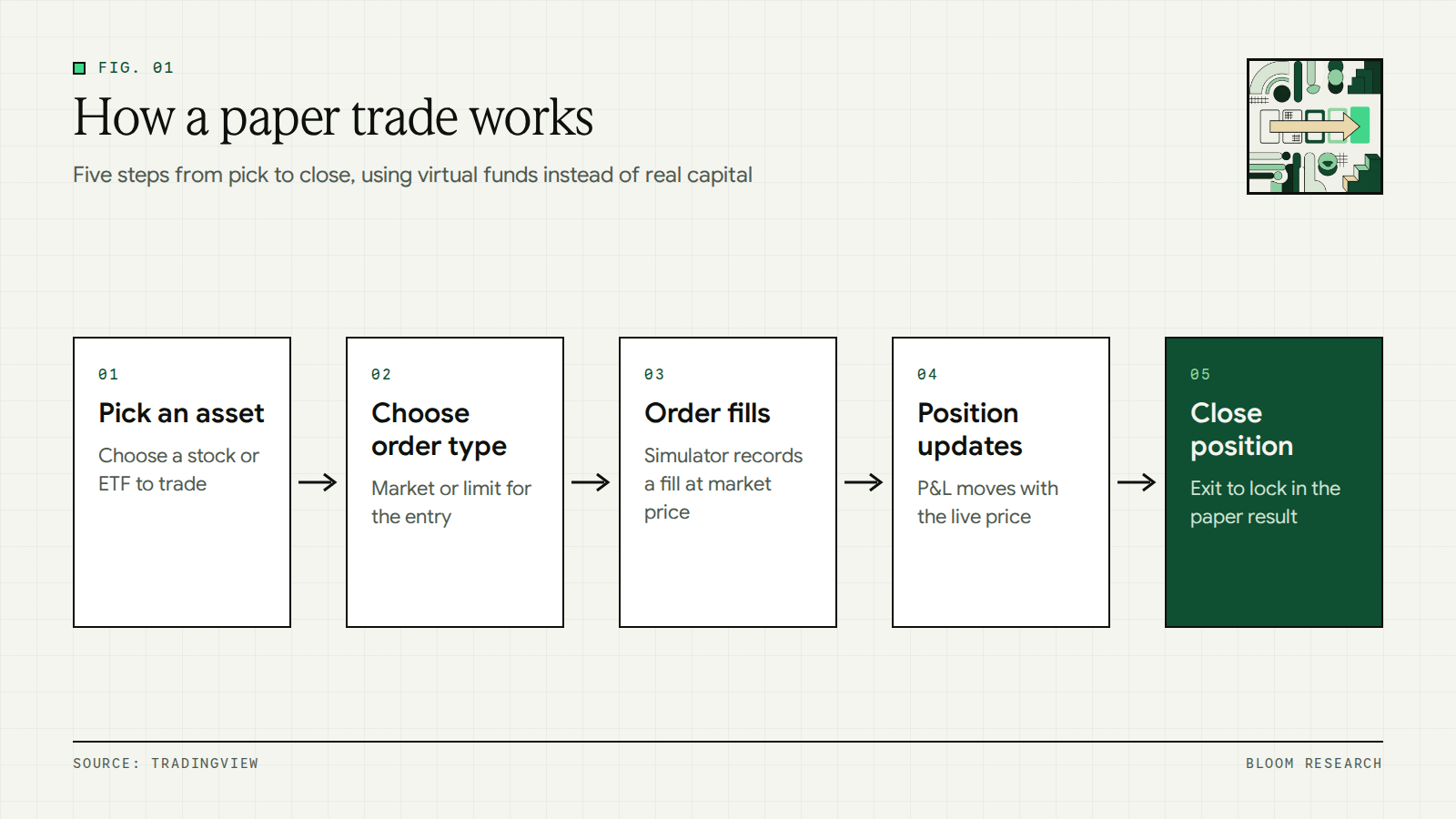
Two parts of this sequence differ from a live trade. The fill in the third step comes from the simulator rather than from a live quote. Trading costs appear in the result only if the simulator or you add them. The sections on practice routines and on the limits of paper trading later in this guide cover both points in detail.
#Why practice trading without risking money
Regulators in the United States and India have published findings on how often individual traders lose money. The SEC's investor publication on day trading states that day traders typically suffer severe financial losses in their first months of trading, and many never graduate to profit-making status. The same SEC publication notes that day traders also have high expenses, paying their firms large amounts in commissions, for training and for computers.
In India, a SEBI press release dated September 23, 2024 reported an updated SEBI study of equity futures and options (F&O). The study found that 93% of individual traders incurred losses in equity F&O between FY22 and FY24, with aggregate losses exceeding ₹1.8 lakh crore over three years.
Key point: Paper trading does not change these statistics. It gives you a place to test a process before any money is involved.
Paper trading lets you practice the parts of trading that do not depend on having money at stake:
- Order entry: choosing the side, the order type and the size without input errors.
- Reading a quote: checking the price, the daily change and the order details before you submit.
- Position sizing: deciding how much of the balance a single trade uses.
- Following written rules: entering and exiting only when your plan says so.
- Reviewing results: recording each trade and checking which decisions matched your rules.
The same steps apply when you place a live trade. Practicing them with virtual funds separates learning the mechanics from the separate task of managing real gains and losses.
#Paper trading vs real trading
Paper trading and real trading use the same order steps, but they differ in more than whether money is at risk. The table compares them on five points, from money at risk to what each one teaches.
| Factor | Paper trading | Real trading |
|---|---|---|
| Money at risk | None, because trades use virtual funds | Your own money |
| Fills | Recorded by the simulator at the market price | Depend on the live quote and the liquidity available when the order is placed |
| Costs | Not charged unless you add them to each result yourself | Trading costs, such as commissions, reduce each result |
| Emotional pressure | Low, because a loss has no financial effect | Higher, because a loss reduces your own money |
| What you learn | Order entry, platform use and following written rules | How you make decisions when your own money is at stake |
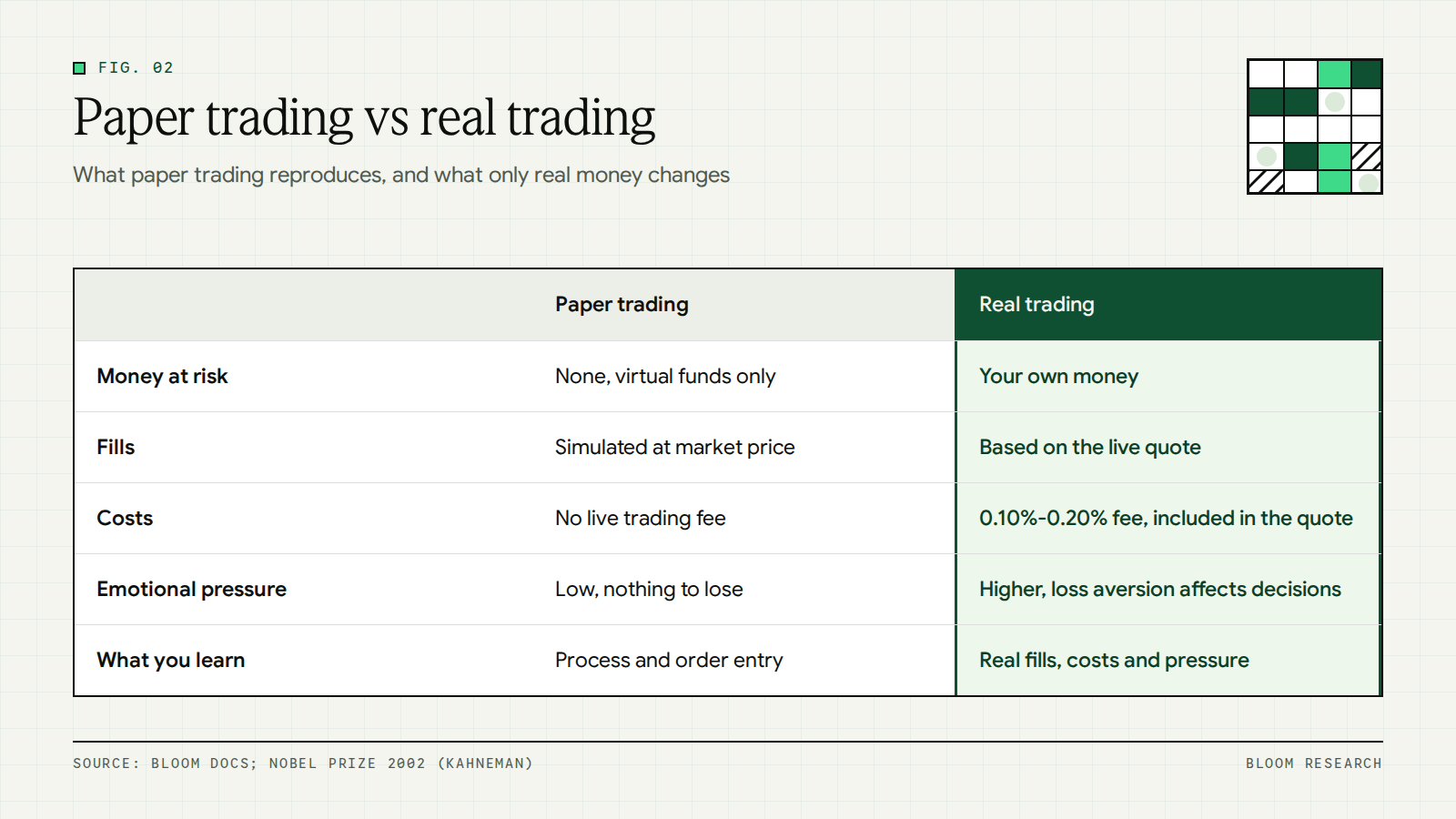
Emotional pressure is the row that a simulator cannot reproduce. The popular information for the 2002 Nobel Prize in economic sciences, which describes the work of Daniel Kahneman, states that most individuals seem to be more averse to losses, relative to a reference level, than partial to gains of the same size. This pattern is known as loss aversion. Because a paper loss costs nothing, a simulator cannot show how loss aversion affects your own decisions. A plan that is easy to follow with virtual funds can be harder to follow when a loss comes out of your own account.
On Bloom, a real trade buys a tokenized stock, which is an on-chain token backed 1:1 by a real share held in custody at a regulated US broker-dealer such as Alpaca Markets or Interactive Brokers. The token tracks the price of the underlying share in real time, so the P&L on a live position reflects real gains and losses in your own account.
#How to start paper trading
Paper trading results carry more meaning when every trade follows a routine with written rules. The steps below set up that routine, so each simulated trade can be reviewed against a plan instead of a memory.
To choose a simulator, our comparison of paper trading apps sets out the markets, virtual balance, cost and price data for each app. Our comparison of the best stock market simulators covers seven simulators by cost, starting virtual cash, assets, price data and who can use them. For crypto assets, our guide to crypto paper trading compares the official demo, testnet and paper trading options from Binance, Bybit, Kraken, TradingView and Delta Exchange India.
Set a virtual balance close to your planned live amount
Decide first how much money you plan to trade with when you start using real funds. Then work with a virtual balance of a similar size, so position sizes and percentage results stay comparable later. If the simulator provides a larger balance, trade only the portion that matches your planned live amount.
On Bloom, the minimum trade is $1, and the platform imposes no maximum. Fractional shares are supported down to six decimal places on every asset. A small planned amount can therefore be mirrored in paper trades with the same position sizes you would place live.
Write your rules before each trade
Written rules turn each paper trade into a test of a plan. Record these five points before you place the order:
- Entry reason: the specific condition that leads you to enter the trade.
- Position size: the amount in dollars or shares, and its share of the balance.
- Exit price: the price at which you plan to take the gain.
- Stop level: the price at which you plan to close a losing position.
- Maximum loss per trade: the most you accept losing on this trade, in dollars or as a share of the balance.
After the trade closes, compare the outcome against each rule. A trade that made money while breaking a rule still counts as a rule break in the journal.
Use the order types you will use live
Practice with the same order types you intend to use with real money. A market order is an order to buy or sell a security immediately. It guarantees that the order will be executed, but it does not guarantee the execution price. A limit order is an order to buy or sell a security at a specific price or better.
According to Investor.gov's guide to types of orders, a buy limit order can only be executed at the limit price or lower. A sell limit order can only be executed at the limit price or higher.
Two more terms appear in most trade tickets. A stop loss is a conditional sell order triggered when the underlying price falls to a target. A take profit is a conditional sell order triggered when the underlying price reaches an upside target.
On Bloom, the Quick Trade sheet with Market and Limit orders has a Market or Limit control, and Market is the default. The limit price input offers quick suggestions at the last traded price (LTP) and at LTP minus 1%, 5% and 10%. Take Profit and Stop Loss inputs are placed as resting orders that trigger automatically when the underlying price reaches the target. Using the same order types in paper trades builds familiarity with the controls you will use later.
Include fees and slippage in every result
The Investor.gov page on understanding fees notes that fees may seem small, but over time they can have a major impact on an investment portfolio. A paper result recorded without fees does not match what the same trade would return with real money.
Our live trading fee ranges from 0.10% to 0.20%, or 10 to 20 basis points. The default rate is 0.20%, and the fee drops toward 0.10% as your 14-day trading volume grows through the VIP tiers. The tier table on our pricing page lists the fee at each level. The quoted price already includes the trading fee, as our pricing and fees documentation describes.
Slippage is the difference between the price quoted when you submit an order and the price at which it executes. Our slippage tolerance setting sets the maximum acceptable drift between quote and execution. The default is 0.5%, and it can be changed to 0.1%, 1% or a custom value in the trade sheet. Record a slippage allowance for each paper trade as a separate cost line in the journal.
In practice: Subtract the live fee from each paper result before you log it. A $1,000 trade at Tier 1 carries a $2.00 trading fee at the 0.20% rate. The sell that closes the position is also a trade and carries its own fee, so both fees come off a paper profit or add to a paper loss.
Keep a trading journal
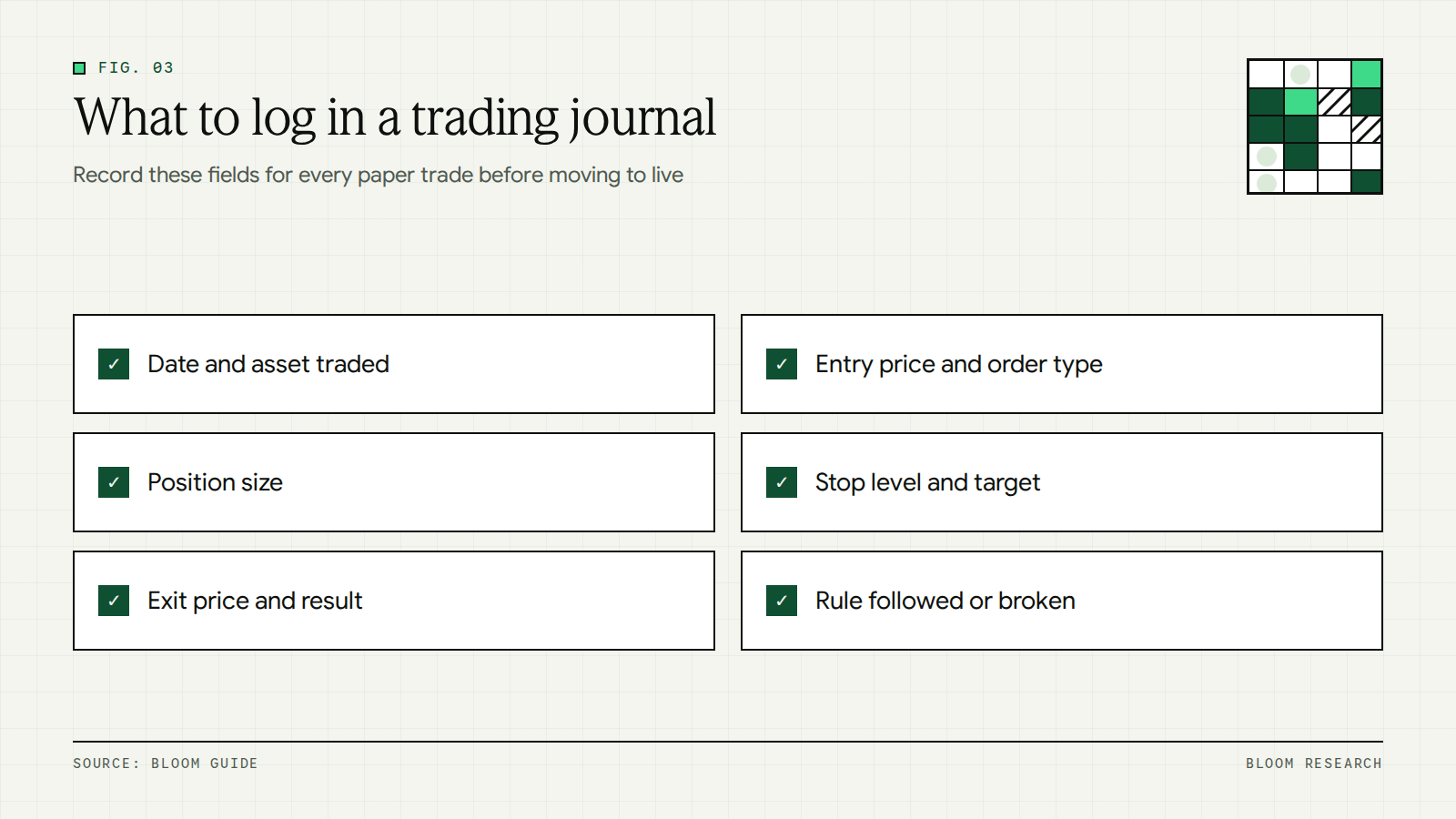
A trading journal is a record of every trade with its reasons and its results. Log these fields for each paper trade:
- Date and time of entry and exit
- Asset name and ticker
- Order type (market or limit) and side (buy or sell)
- Position size and entry price
- Exit price and the reason for the exit
- Result after fees and slippage
- Rules followed and rules broken
- A short note on your state of mind during the trade
Recording the same fields for paper and live trades keeps the two records comparable. Our Portfolio page with CSV export exports a complete CSV of every trade and transaction, including every fee. That file can then be compared line by line with your paper journal.
#What to track to measure progress
A journal becomes useful when its entries are summarized into a few metrics. The table lists five metrics that can be calculated from any paper trading record.
| Metric | What it shows | How to calculate |
|---|---|---|
| Win rate | Share of trades that closed with a profit | Winning trades divided by total closed trades |
| Average win vs average loss | Size of typical gains compared with typical losses | Total profit on winning trades divided by their count, and the same for losing trades |
| Maximum drawdown | Largest fall in account value from a peak | Peak value minus the lowest later value, divided by the peak value |
| Total costs | How much fees and slippage reduced results | Sum of all fees and slippage across the period |
| Rule adherence | How often trades followed the written plan | Trades that followed every rule divided by total trades |
Drawdown is the decline in account value from a previous peak to a later low. Maximum drawdown is the largest such decline during the period under review. A high win rate combined with a small average win and a large average loss can still produce a net loss, so the metrics are read together.
A short routine keeps the review consistent:
- Review the journal once a week and update each metric.
- Compare every closed trade against the rules written before it.
- Note which rule was broken most often.
- Write down one change to test in the following week.
Note: A sample of a few trades says little about a method. Keep reviewing the same metrics across many trades before drawing conclusions from them.
#The limits of paper trading
Paper trading records the process of a trade, but a simulator does not reproduce every condition of a live market. The points below cover where a paper result and a live result can differ.
- Fills: Investor.gov notes that the last-traded price is not necessarily the price at which a market order will be executed. A paper fill recorded at the displayed price can therefore differ from a live fill.
- Liquidity: Liquidity is the availability of quotes to trade against. On Bloom, the tokenized security issuers that quote prices may withdraw liquidity in extreme conditions. When this happens, the trade sheet will not return a quote and you cannot execute until liquidity returns.
- Price gaps: Prices can move sharply between sessions, including overnight gaps that may exceed your slippage tolerance or Stop Loss trigger.
- Market hours: The NYSE core trading session runs from 9:30 a.m. to 4:00 p.m. ET. On Bloom, if the market is closed, the order is queued and executes automatically at the next market open, and you receive a push notification when it fills.
- Extended sessions: Pre-market or after-hours orders on Bloom route to the extended session, may partially fill, and the remainder is queued. Our page on trading hours and order queueing lists each state and the receipt you see.
- Emotional pressure: The comparison of paper trading and real trading earlier in this guide explains why decisions can change when real money is at stake. A paper account records each decision but not the pressure behind it.
Live trades on Bloom execute through RFQ (Request-For-Quote), the execution model in which a tokenized security issuer returns a live quote that you accept within a short window. For assets with continuous markets, orders fill immediately at the prevailing RFQ price regardless of time of day.
Important: A paper trading result shows how a set of written rules performed in a simulator. It does not predict a live result, and practice does not prevent losses.
#Paper trading on Bloom
Our Paper Trading Challenge is a practice competition that runs on virtual funds. Participants execute trades to earn points, keep a 5-day trade streak and move up the weekly leaderboard. Only eligible manual paper trades count toward the challenge.
Rules and current standings are on the Paper Trading Challenge page and weekly leaderboard, and trades are placed in our paper trading app. The weekly paper leaderboard shows the top 100 of the week, ranked by Bloom Points. It ranks Bloom Points from executed paper trades starting August 14, 2026.
On Bloom: The weekly paper leaderboard is paper trading only, with no live funds. Our homepage describes the competition as a way to practice with virtual funds, help shape Bloom, and earn points along the way.
How points and the weekly leaderboard work
Points recognize participation, consistency, ranking and useful reports. Points come from executed trades: 2 points each for your first 10 trades, then 4 points per trade. The 5-day streak requires at least one executed paper trade each day for 5 days, and missing a day resets the streak.
| Action | Points |
|---|---|
| Join paper trading by creating your paper trading profile | 100 |
| Each of your first 10 executed paper trades | 2 |
| Each executed paper trade after your first 10 | 4 |
| Submit an accepted bug report | 200 to 100,000, based on validated severity |
| Place on the weekly leaderboard | Rank based |
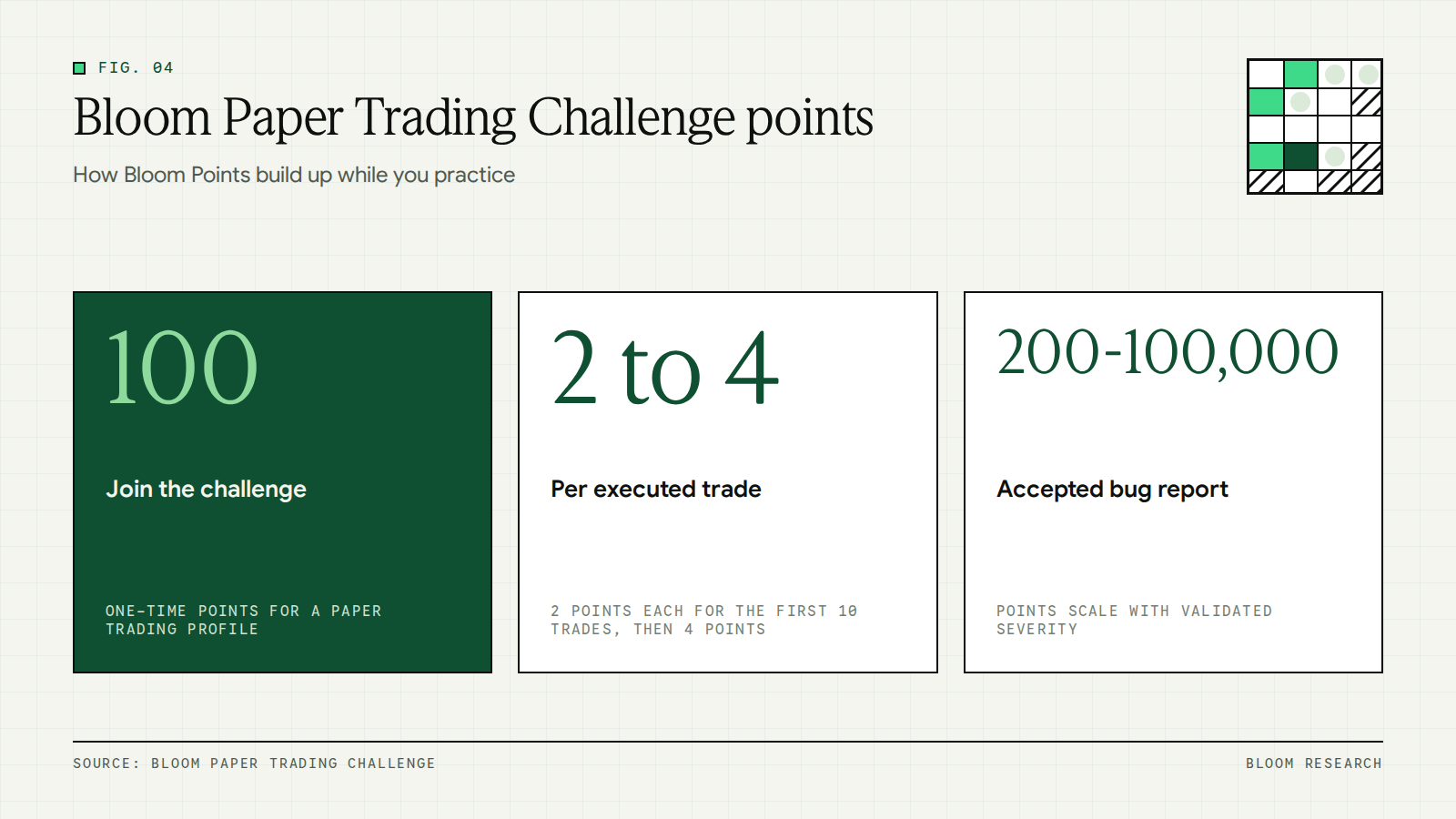
Weekly leaderboard placement points go to participants who finish in an eligible rank at the end of the week. The leaderboard is ranked by Bloom Points, so trade count and streak length both appear next to each participant but do not set the rank on their own.
Reporting bugs while you practice
Bloom is in public beta. Our homepage lists the competition steps as trade daily, report bugs and earn points.
Points for an accepted bug report depend on the severity our review validates, within the range in the table above. The Help us improve section of the challenge page explains what makes a useful report, how to estimate severity, and how to preview the details before submission opens. Logging the asset, the order type and the time of each paper trade in your journal gives you the details a report needs.
#Moving from paper trading to live trading
Trades on Bloom execute via RFQ through regulated tokenized security issuers, so a live trade adds funding and a live quote to the routine you practiced on paper.
- Fund your account. You can receive USDC from any external wallet, and the funding sheet only shows methods that work on your current device. When you receive USDC, you pick the network in the deposit flow, and each network shows its address and QR alongside an estimated finality time. Our list of networks supported for USDC deposits covers each option.
- Place your first trade. Opening the trade sheet sends a quote request for your size and side. A regulated tokenized security issuer returns a live quote, typically valid for 5 to 10 seconds, and tapping Confirm within the quote window commits the trade at that price or within your slippage tolerance. Our page on how RFQ execution works covers each stage.
- Review the receipt. Within about 1 second, you see the receipt with the action, fill price, fee, total and on-chain transaction hash. Our first trade guide shows the full flow from asset to receipt.
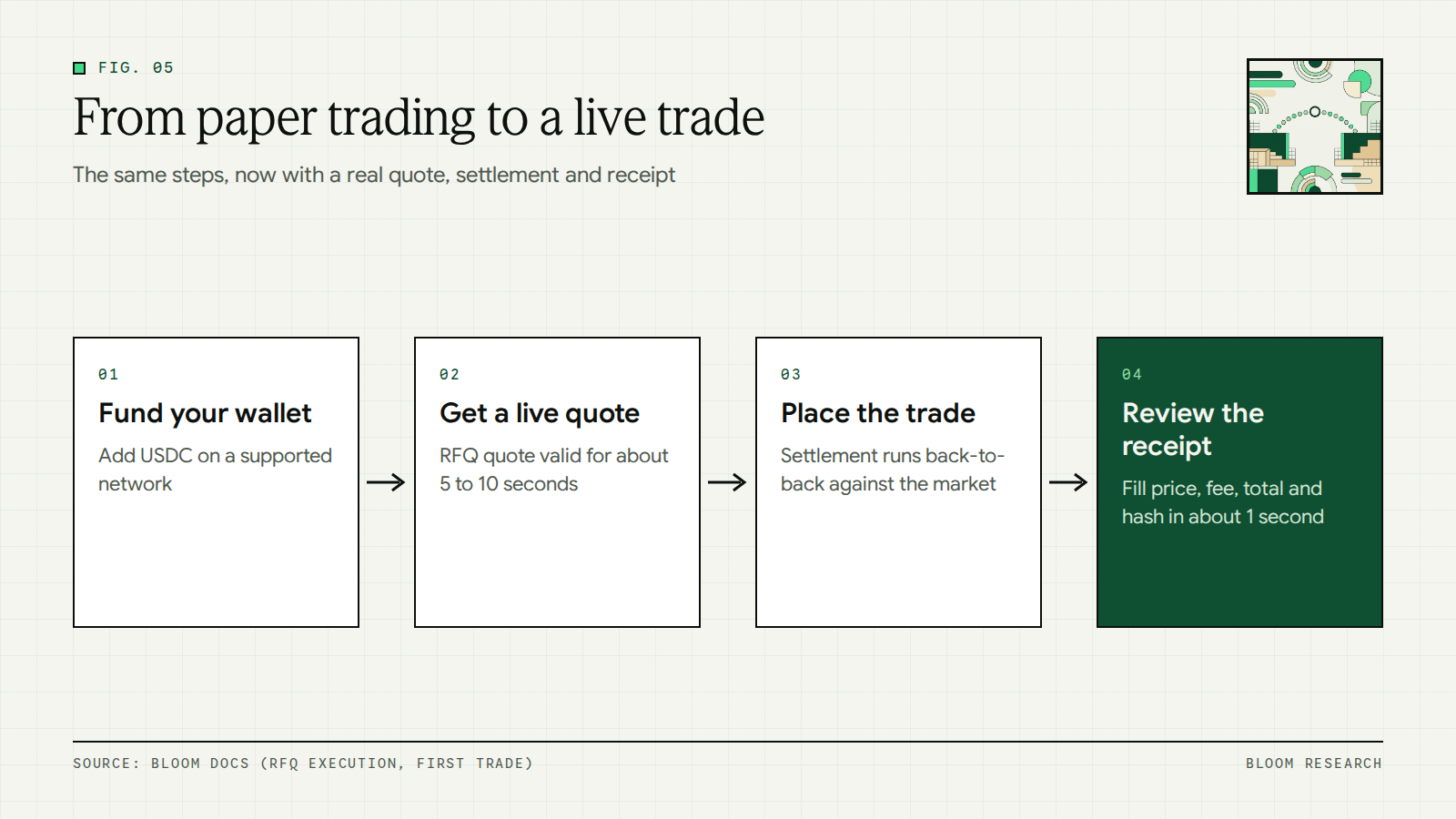
The trade settles back-to-back against the underlying primary market, and the on-chain token transfers to or from your wallet. The fill price and fee on the receipt can be logged next to your paper results in the same journal.
Our guide to tokenized stocks explains what the token in a live trade represents. Orders placed outside regular hours behave differently, as our guides to pre-market trading and trading US stocks on weekends explain.
For readers in India, our guide to investing in US stocks from India covers the routes available, and our page on US stocks and ETFs popular with investors in India lists the popular names.
Our explainer on what RFQ trading is covers how the live quote in a real trade is produced.
#Start practicing with virtual funds
The Paper Trading Challenge gives a place to practice with virtual funds, log each trade and review results against written rules before any money is involved. The streak, the points and the weekly leaderboard all count executed paper trades only.
Trading on Bloom carries risk, including the loss of principal. Market risk, smart contract risk, custody risk, bridging risk and liquidity risk apply, as set out in our risk disclosure. We do not offer our product or services to users in the United States or in other restricted jurisdictions, as explained on our service availability page.
Frequently asked questions
What is paper trading?
Paper trading is the practice of placing simulated trades with virtual funds instead of real money. TradingView's help center describes it as demo trading with no deposits and no real money involved, tested in close-to-real market conditions. Each paper trade has an entry, a size and an exit, so you can measure its profit or loss and review your process before any money is involved.
How does paper trading work?
You pick an asset, choose an order type such as a market order or a limit order, and enter a size. The simulator records a fill at the market price and takes the cost from your virtual balance. The profit or loss on the position updates as the price moves, and when you close it, the result is added to or taken from the virtual balance.
Is paper trading 100% free?
A paper trade uses virtual funds, so no real money is spent when you place it. Our weekly paper leaderboard is paper trading only, with no live funds, and creating a paper trading profile earns 100 Bloom Points. Live trades are different: our live trading fee ranges from 0.10% to 0.20%, and the quoted price already includes the trading fee. Adding that fee to each paper result keeps it comparable with a live result.
Which app can I use for paper trading?
Several platforms offer paper trading. TradingView's help center, for example, describes its paper trading as demo trading with no deposits and no real money involved. On Bloom, trades for our Paper Trading Challenge are placed in our paper trading app, and the challenge page shows the weekly leaderboard of the top 100 participants ranked by Bloom Points from executed paper trades.
How do I start paper trading?
Start by creating a paper trading profile in our paper trading app, which earns 100 points in our Paper Trading Challenge. Write down your rules for entry, exit and position size before each trade, place trades with virtual funds, and record every result in a journal. Executing at least one paper trade each day for 5 days builds the challenge streak, and missing a day resets it.
How is paper trading different from real trading?
Paper trading uses virtual funds, so no money is at risk, and the simulator records fills at the market price. Real trading uses your own money, fills depend on the live quote and available liquidity, and trading costs reduce each result. The popular information for the 2002 Nobel Prize in economic sciences states that most individuals seem to be more averse to losses than partial to gains of the same size.
Can I paper trade US stocks from India on Bloom?
Our paper trading uses virtual funds, and the assets we offer include US stocks listed on NYSE, NASDAQ and AMEX and US ETFs such as SPY, QQQ and VOO. Our India page shows popular stocks and ETFs to buy from India. We do not offer our product or services to users in the United States or in other restricted jurisdictions, and our service availability page lists the details.