Crypto Paper Trading: How to Practice Before You Trade
Crypto paper trading guide: compare official demo, testnet and paper trading options from Binance, Bybit, Kraken, TradingView and Delta Exchange India.
Key takeaways
- Crypto paper trading means placing simulated crypto trades with virtual funds, so you can practice order entry and review results before your own money is at risk.
- Bybit's help center states that its demo account simulates mainnet price movements, while its testnet operates independently of mainnet prices and has its own order book.
- Binance, Bybit, Kraken, TradingView and Delta Exchange India each describe a demo, testnet or paper trading option on their official help or developer pages.
- Paper results leave out slippage, network costs and, for live trades in India, tax on VDA transfer income at a flat rate of 30% plus surcharge and cess.
- A live trade on Bloom executes through RFQ, with a quote typically valid for 5 to 10 seconds and a default slippage tolerance of 0.5%.
Crypto paper trading means placing simulated crypto trades with virtual funds, so you can practice order entry and review results before your own money is at risk. Virtual funds are a practice balance issued by a platform, with no cash value and no option to withdraw it. Most crypto practice happens in one of two places: an exchange demo account that follows live prices, or a testnet that runs as a separate environment with its own test tokens.
This guide explains how those two forms differ, which demo and testnet options exchanges describe on their own help pages, how to structure a crypto practice session, and what paper results leave out. For the general method, including a written routine and a trading journal, see our guide to paper trading without risking money. For simulators built around stocks, our paper trading apps comparison sets out markets, balances and costs. Our markets page lists the assets available for live trading on Bloom.
#What crypto paper trading is
A paper trade follows the same steps as a live trade. You choose a trading pair, pick an order type, enter a size, and track the position until you close it. The practice platform fills the order in its own simulation, and the profit or loss changes your virtual balance instead of a real one.
Crypto adds steps that stock practice does not have. A demo balance can include stablecoins such as USDT and USDC, as Bybit's demo account does, and trading pairs are quoted against coins like these. Moving funds on-chain also requires choosing a network. A practice account lets you repeat each of these steps before any of them involves real funds.
Virtual funds and simulated fills
On an exchange demo account, the simulation uses the exchange's live market data. Bybit's help center states that its demo account accurately simulates price movements on mainnet, and that executed demo orders do not enter the actual order book. A demo order therefore does not affect the order book or price movements on the live exchange.
A live fill works differently. On Bloom, trades execute through RFQ (Request-For-Quote): a regulated tokenized security issuer returns a live quote, typically valid for 5 to 10 seconds, and the trade executes only when you accept it. Our guide to how RFQ trading works explains each step of that process.
Three places to practice
Crypto practice tools fall into three groups, and each group simulates a different part of trading:
- Exchange demo accounts: a simulated account inside the main exchange that uses live market prices and a virtual balance.
- Testnets: separate networks or exchange platforms with their own test tokens and, on an exchange testnet, a separate order book.
- Paper trading tools: simulators on charting platforms or in command-line tools that place virtual orders against market prices.
The next section lists the official options in each group, as the platforms describe them on their own help and developer pages.
#Crypto demo account vs testnet trading
A crypto demo account and a testnet are separate products, even though the two terms are often used for the same thing. A demo account is a simulated trading account inside an exchange's main platform. A testnet is a separate environment built for testing, where tokens and balances are not meant to carry real value.
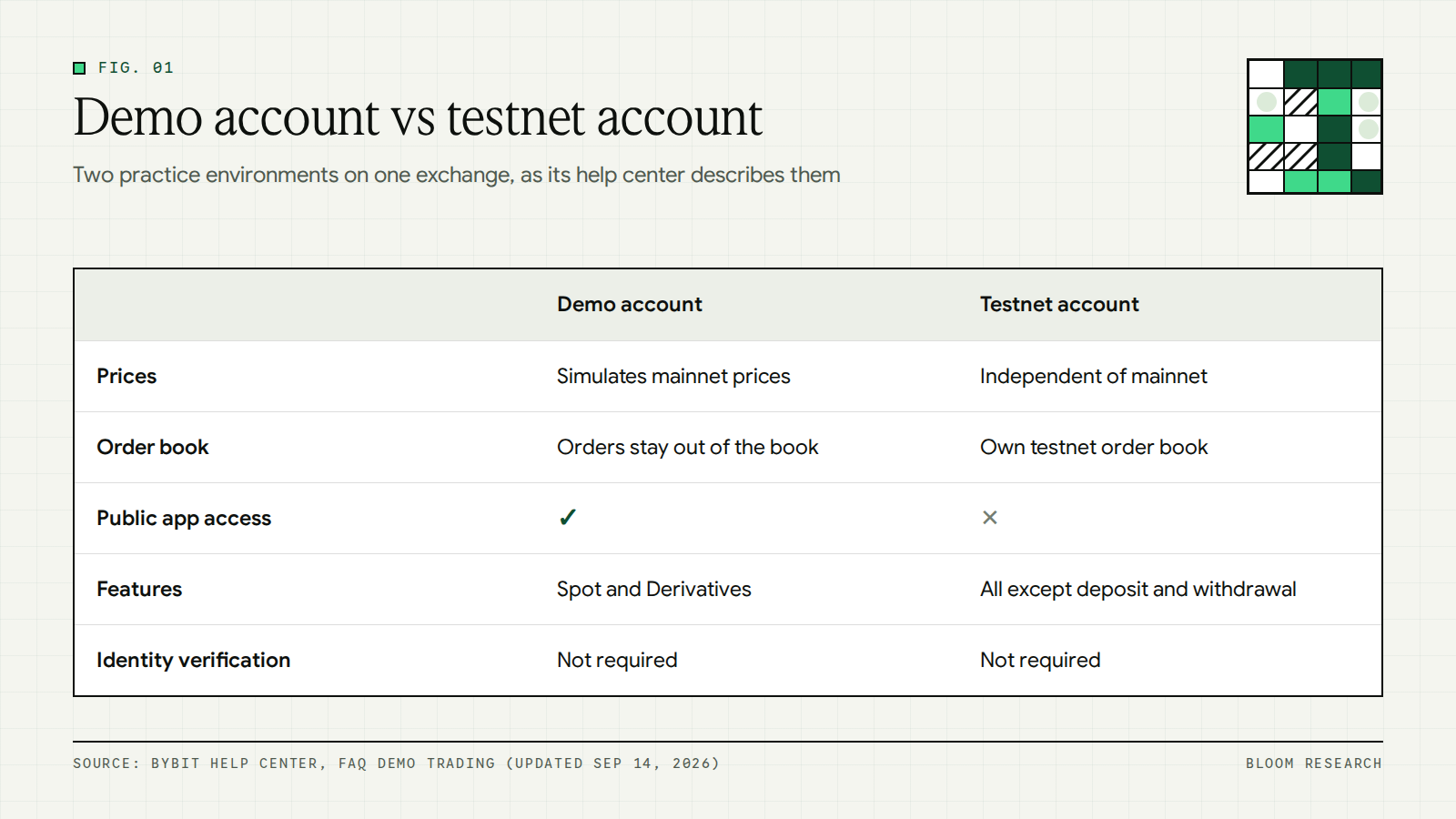
Bybit's demo trading FAQ compares its two environments directly. It states that a demo account operates within the main trading platform, while a testnet account is an entirely separate platform used primarily for testing new features and updates. The same page states that testnet accounts may not always provide the most accurate representation of live trading conditions.
The comparison table on that page sets out the practical differences between the two:
- Prices: the demo account simulates price movements on mainnet, while the testnet operates independently of mainnet price fluctuations and market movements.
- Order book: demo orders do not enter the actual order book, while testnet orders transact within the testnet order book and influence testnet prices.
- Access: the demo account opens on web, app and API with your main account or subaccount login, while the testnet has web and API access but no public app access.
- Features: the demo account offers Spot and Derivatives trading, while the testnet offers all platform features excluding deposit and withdrawal.
- Identity checks: Bybit states that identity verification is not required for the demo account or the testnet account.
Definition: Mainnet is the primary public blockchain, where actual-value transactions occur. A testnet is a network that developers use to test protocol upgrades and smart contracts in a production-like environment before deployment to mainnet.
Blockchain testnets follow the same logic as exchange testnets. The Ethereum developer documentation on mainnet and testnets states that ETH on testnets is supposed to have no real value, although markets have been created for certain types of testnet ETH that became scarce or hard to obtain. It also states that testnet ETH is usually obtained for free from faucets. A faucet is a web app where you enter an address and request test tokens to be sent to it.
Which one matches what you want to practice
Each environment tests a different part of a trade. A demo account tests your trading decisions, since it prices your orders at live market prices. A testnet tests your process, since it keeps API calls, order handling and wallet transfers separate from live market conditions.
Paper trading crypto on a demo account is the closer match for practicing entries, exits and position sizes. A testnet is the environment built for testing trading bots, API integrations and on-chain transactions before they reach mainnet.
Bybit's own table states the same split in its target audience row. It lists the demo account for users who want to practice trading based on live market data without risking real assets, and the testnet for users who want to test all Bybit features. The same row states that the demo account is not recommended for institutional users. Bybit also states that the demo account automatically syncs with the latest mainnet updates, and that the demo account is designed for trade simulations and testing of trading features based on market prices.
Key point: Neither a demo account nor a testnet uses real funds, and neither one reproduces a live fill. Both leave out the fees, slippage and quote timing covered later in this guide.
#Official crypto demo and testnet options compared
Several exchanges and trading platforms publish their own environments for crypto paper trading. The table below summarizes each one using only what its official help or developer page states as of September 2026. Features and availability change, so the platform's own page is the reference before you sign up.
| Platform | Type | Markets named | Practice funds | Access notes |
|---|---|---|---|---|
| Binance Demo Trading | Exchange demo | Spot, USDⓈ-M Futures, COIN-M Futures | Virtual funds, reset separately for Spot and Futures | Web at demo.binance.com or the app; certain countries and regions only |
| Binance Spot Test Network | Exchange testnet | Spot API | Testnet account for API testing | API keys after logging in with a GitHub account |
| Bybit Demo Trading | Exchange demo | Spot and Derivatives | 50,000 USDT, 50,000 USDC, 1 BTC and 1 ETH | Main account login; no identity verification |
| Bybit Testnet | Exchange testnet | All features except deposit and withdrawal | Test coins requested once per 24 hours | Web and API; no public app |
| Kraken CLI | Paper trading tool | Spot and futures paper commands | Paper balance in the CLI | No authentication for paper trading |
| TradingView Paper Trading | Paper trading tool | Stocks, forex, crypto, futures and more | Simulated money, no deposits | Available globally for all users |
| Delta Exchange India Demo Trading | Exchange demo | Futures | Virtual funds in a Demo Wallet | Separate demo account; web browsers only |
Binance Demo Trading
Binance's Demo Trading FAQ describes it as a virtual trading interface for practicing with virtual funds on both Futures and Spot markets. The supported products are Spot, USDⓈ-M Futures and COIN-M Futures. You can open it on the web at demo.binance.com with your Binance login, or in the Binance app under More and then Demo Trading.
The FAQ states that virtual funds can be reset separately for the Spot and Futures accounts. Its disclaimer describes the demo balances as mock tokens with no economic or monetary value. Users who have not completed identity verification can access Demo Trading for Spot and Futures, subject to eligibility requirements. The same page states that Binance Demo Trading is available to users in certain countries and regions only.
Binance also runs a separate Spot Test Network for developers. Its Spot API testnet documentation states that API keys can be created on the Spot Test Network after logging in with a GitHub account. The Spot Test Network is documented within Binance's Spot API documentation, separate from the Demo Trading FAQ.
Bybit Demo Trading and testnet
Bybit's demo trading FAQ states that Demo Trading is an account in Unified Trading Account (UTA) mode, which allows simulated trading for both Spot and Derivatives. The Unified Trading Account is the Bybit account mode that holds both of those trading types. You do not create the demo account manually, because it is available to all users and opens from the profile menu on the website or the profile settings page in the app.
A new Bybit demo account receives simulated assets of 50,000 USDT, 50,000 USDC, 1 BTC and 1 ETH. You can request additional assets only when the total equity value falls below 10,000 USDT, and only these four assets can be requested. The funds are simulated assets and cannot be withdrawn.
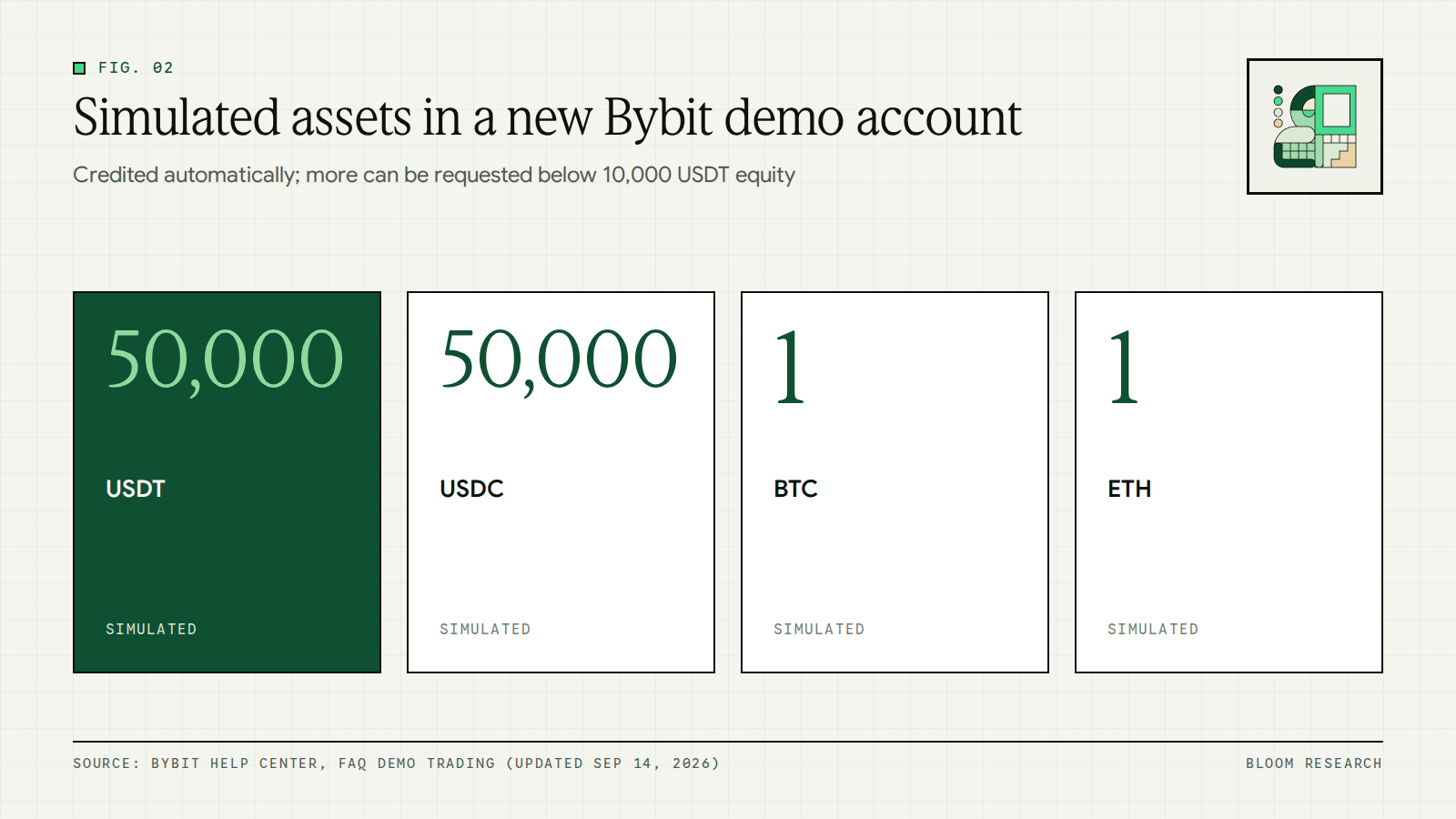
The FAQ states that the demo account cannot be reset. If you do not access it for 30 days, the demo account is refreshed and its data is cleared. Bybit's demo trading API documentation adds that basic trading rules are the same as real trading, that orders generated in demo trading are kept for 7 days, and that public market data is identical to that found on mainnet.
The Bybit testnet is a separate platform. Testnet users request test coins manually from the asset overview page, once per 24 hours, and the testnet has web and API access but no public app access.
Kraken, TradingView and Delta Exchange India
Kraken's developer documentation states that the Kraken CLI includes a built-in paper trading engine that runs against live prices with no authentication required. The CLI has separate paper commands for spot and for futures. Switching from paper to live is a matter of removing the paper subcommand and providing credentials. For its spot REST, WebSocket and FIX APIs, Kraken's support center states that it offers a testing environment for qualified clients, with access through an onboarding process started by contacting its API team.
Kraken's support center also describes a validate parameter for its REST and WebSocket order endpoints. When it is set to true, the order details are checked for errors, but the API response never includes an order ID, which Kraken states would always be returned for a successful order without the parameter. This checks the format of an order without a paper balance or a fill.
TradingView's paper trading help page describes Paper Trading as a way to practice buying and selling assets using simulated money, with no deposits and no real money involved. The page states that the simulator supports almost every asset class available on TradingView, including stocks, forex and crypto. It also states that Paper Trading is available globally for all users.
Delta Exchange India's demo trading guide states that users receive virtual funds in a Demo Wallet. The guide lists market or limit orders, long or short positions and leverage among the things you can practice. A separate account is required, because main account credentials do not work on the demo platform. Demo Trading is available only in web browsers, and demo funds cannot be transferred or withdrawn.
Note: Each of these pages can change without notice, and Binance states that its demo is limited to certain countries and regions. Check the platform's own help page for current products, balances and eligibility before relying on any row in the table above.
#Testnet trading for wallets and on-chain orders
Exchange demo accounts do not cover the on-chain part of crypto trading: sending tokens to an address on a chosen network. Testnet trading covers that part. The Ethereum developer documentation states that Sepolia is the recommended default testnet for application development, and test ETH on it comes from faucets, as described earlier in this guide.
Some on-chain exchanges run their own testnets. Hyperliquid's documentation on its testnet faucet states that users who have deposited on mainnet with the same address may receive 1,000 mock USDC for testnet use. It adds that an email login generates a different wallet address for mainnet and testnet.
Definition: A network, in wallet terms, is the blockchain that a transfer is sent on, such as Ethereum mainnet or the Sepolia testnet. A testnet transfer uses the same steps as a mainnet transfer, with test tokens in place of real ones.
Network choice also applies when you fund a live account. On Bloom, when you receive USDC from an external wallet, you pick the network in the deposit flow, and each supported network shows its address and QR code with an estimated finality time. Our page on supported networks explains that balances are per-chain at the wallet level, and that cross-chain bridging shows the fee and route before you confirm. Our guide to adding funds lists the funding options, including receiving USDC from any wallet on any supported chain.
#How to practice crypto trading before you trade live
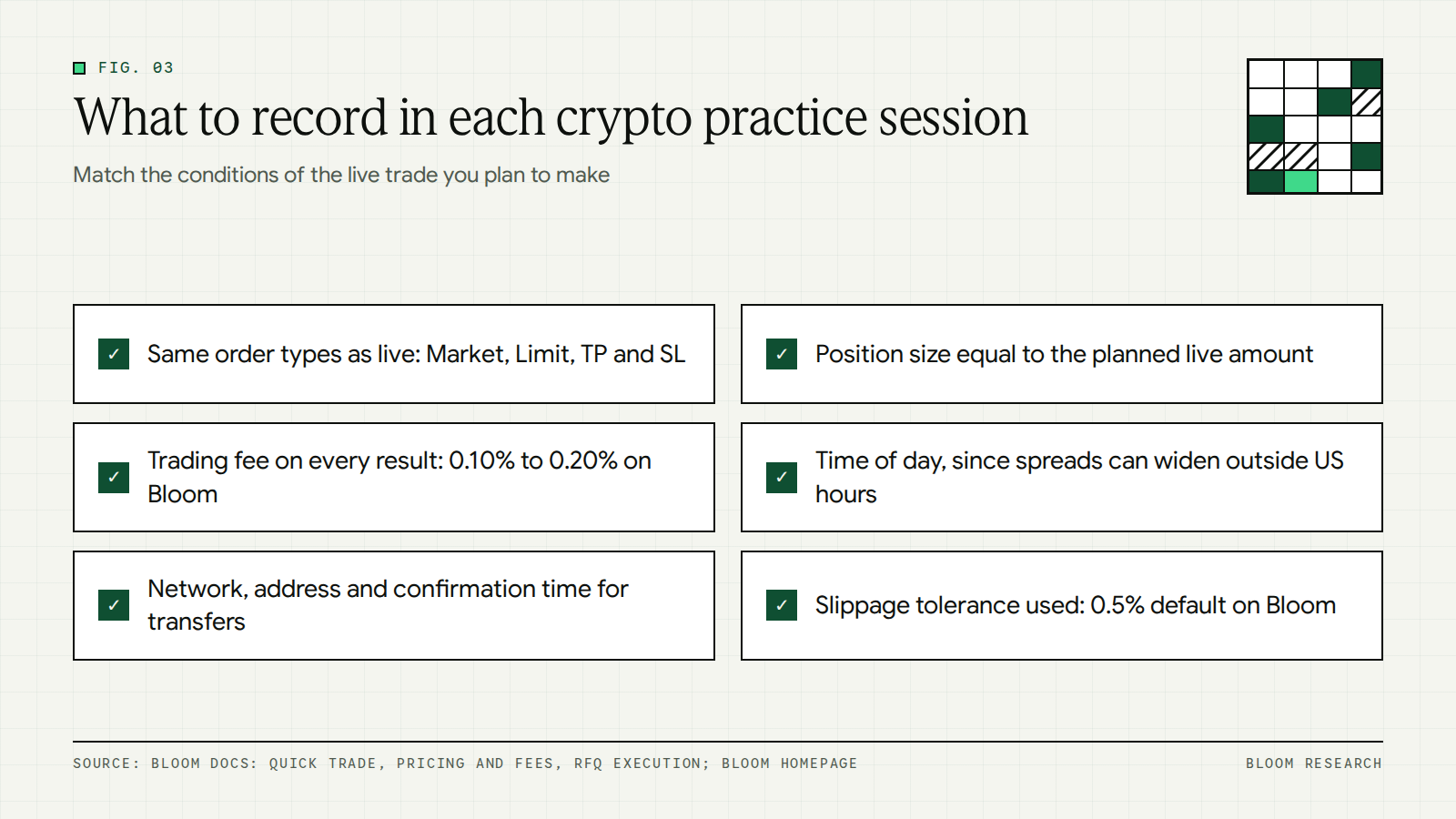
A crypto paper trading session produces useful records only when it copies the conditions of the live trade you plan to make. The steps below apply that idea to crypto, where order types, fees, timing and network choice all differ from one platform to another. Our general guide on paper trading covers the written routine and the trading journal, so this section keeps to the crypto-specific details.
- Use the order types you plan to use live. On Bloom, the Quick Trade sheet has a Market or Limit control, with Market as the default, and optional Take Profit and Stop Loss inputs that trigger when the underlying price reaches the target.
- Size each practice position to the amount you plan to trade live. A demo balance can be much larger than a planned live amount: Bybit credits 50,000 USDT to a new demo account. On Bloom, the minimum trade is $1, with no platform maximum.
- Record the trading fee on every paper result. Our trading fee ranges from 0.10% to 0.20%, the default rate is 0.20%, and the quoted price already includes the fee, as set out on our pricing and fees page.
- Record the time of day of each trade. Our homepage states that liquidity is deepest during regular US market hours, and that outside those hours spreads can widen, so large or urgent orders may see more slippage.
- Record the network for every transfer you practice on a testnet, along with the address format and the confirmation time.
In practice: Write the fee next to each paper result before you total the session. On Bloom, the quoted price already includes the trading fee, so a live result already reflects it.
#What paper trading crypto leaves out
A crypto trading simulator can reproduce prices and order entry, but several costs and conditions appear only in live trading. Demo orders do not enter the actual order book, as Bybit's help center states, so the practice fill does not show how your order interacts with other orders. The subsections below list the gaps that matter most when you move to a live account.
Fees, slippage and network costs
Slippage is the difference between the price you expect when you submit an order and the price at which it fills. Slippage tolerance is the maximum difference you accept. On Bloom, the default slippage tolerance is 0.5%, editable to 0.1%, 1% or a custom value in the trade sheet. If the market moves beyond your tolerance during the quote window, the trade stays in a pending state until you cancel it.
Live trades also carry network costs. Our fee breakdown shows the platform fee of 0.10% to 0.20% based on your VIP tier, plus network gas, which is the fee paid to the blockchain to process a transaction. Our pricing page lists the VIP tiers and the fee on a sample trade at each tier.
Price gaps are a further cost. Our risk disclosure states that asset prices can move against you, including overnight gaps that may exceed your slippage tolerance or Stop Loss trigger. It also states that the tokenized security issuers that quote prices may withdraw liquidity in extreme conditions, and that cross-chain bridges and the underlying blockchains can be congested, halted or compromised. A demo account or a testnet does not reproduce either condition.
Tax on live trades in India
A paper result has no tax line, but a live crypto trade in India can. The Income Tax Department's page on the taxation of virtual digital assets states that income from the transfer of VDAs is computed without any deduction except for the cost of acquisition and taxed at a flat rate of 30% plus surcharge and cess. A VDA, or virtual digital asset, is the category that page covers.
Important: We do not file taxes on your behalf and we do not provide tax advice. From Portfolio, you can export a complete CSV of every trade and transaction to share with your tax advisor or import into your tax software.
#From practice to a live on-chain trade on Bloom
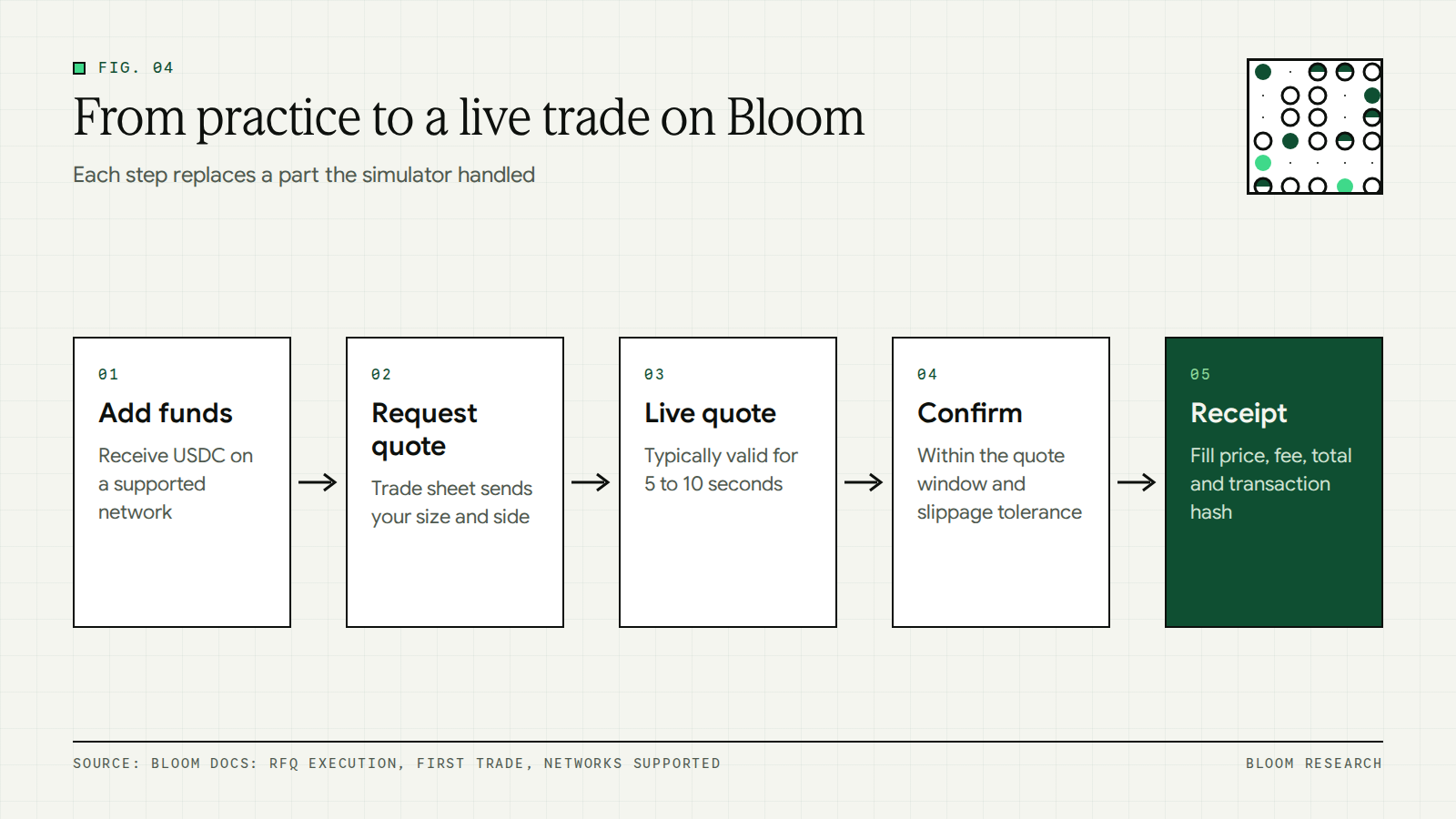
On Bloom, each asset is an on-chain token backed 1:1 by a real share held in custody at a regulated US broker-dealer such as Alpaca Markets or Interactive Brokers. Our RFQ execution documentation lists the steps of a live trade, and each step replaces a part of the paper trade that the simulator handled for you.
- Add funds, for example by receiving USDC on a supported network.
- Open the trade sheet, which sends a quote request for your size and side.
- A regulated tokenized security issuer returns a live quote, typically valid for 5 to 10 seconds.
- Tap Confirm within the quote window to commit the trade at that price, or within your slippage tolerance.
- Within about 1 second, you see the receipt with the action, fill price, fee, total and on-chain transaction hash.
Our guide to placing your first trade shows each screen in that sequence. Timing also differs from crypto practice. Each asset follows the trading session inherited from its underlying instrument, and our page on trading hours and order queueing explains that orders placed outside market hours are queued and execute at the next open. For assets with continuous markets, orders fill immediately at the prevailing RFQ price regardless of time of day. Our guide to trading US stocks on weekends explains what happens to a stock order placed on a Saturday or Sunday.
On Bloom: Our homepage lists a paper trading competition: practice with virtual funds, help shape Bloom, and earn points along the way. The competition steps are to trade daily, report bugs and earn points.
#Start with a written practice plan
Crypto paper trading gives you a record of your decisions at live prices, without real funds at risk. Before you place a live trade, compare that record with the costs listed above: the trading fee, slippage, network gas and, in India, tax on VDA transfer income. Paper results measured after those costs are the ones to compare with your first live results at the same size.
Trading on Bloom carries risk, including the loss of principal. Market risk, smart contract risk, custody risk, bridging risk and liquidity risk apply, as set out in our risk disclosure. We do not offer our product or services to users in the United States or in other restricted jurisdictions, as explained on our service availability page.
Frequently asked questions
Is there paper trading for crypto?
Yes. Several exchanges and platforms offer crypto paper trading with virtual funds. Binance describes Binance Demo Trading as a virtual trading interface for Spot and Futures markets, Bybit offers Demo Trading for Spot and Derivatives in its Unified Trading Account, and TradingView states that its paper trading simulator supports crypto among other asset classes. Binance notes that its Demo Trading is available to users in certain countries and regions only.
What is paper trading in crypto?
Paper trading in crypto is placing simulated crypto trades with virtual funds instead of real money. The practice platform fills your orders in a simulation and updates a virtual balance, so you can test order types, position sizes and timing. On an exchange demo account, Bybit states that executed orders do not enter the actual order book, so they do not impact the order book or price movements.
What is the difference between a crypto demo account and a testnet?
Bybit's help center states that a demo account operates within the main trading platform and simulates price movements on mainnet, while a testnet account is an entirely separate platform used primarily for testing new features and updates. Testnet prices operate independently of mainnet, and testnet orders transact within the testnet order book. Neither environment uses real funds.
Can I withdraw funds from a crypto demo account?
No. Bybit states that the funds in its demo account are simulated assets and cannot be withdrawn, and Delta Exchange India states that demo funds cannot be transferred or withdrawn. Binance describes its demo funds as mock tokens with no economic or monetary value. Delta Exchange India also states that trades and profits in demo mode are virtual and do not apply to your live account.
Do I need KYC for a crypto demo account?
It depends on the exchange. Bybit states that identity verification is not required for its demo account or its testnet account. Binance states that users who have not completed identity verification can access Demo Trading for Spot and Futures, subject to eligibility requirements. Delta Exchange India requires a separate account for demo trading, because main account credentials do not work on its demo platform.
Are testnet coins worth real money?
The Ethereum developer documentation states that ETH on testnets is supposed to have no real value, although markets have been created for certain types of testnet ETH that became scarce or hard to obtain. The same page states that testnet ETH is usually obtained for free from faucets. Exchange testnet assets are also for testing: Bybit states that testnet users request test coins manually and can do so once per 24 hours.
Can I paper trade on Bloom?
Our homepage lists a paper trading competition that invites you to practice with virtual funds, help shape Bloom and earn points along the way. The competition steps are to trade daily, report bugs and earn points. Live trades on Bloom are different: they execute through RFQ, where a regulated tokenized security issuer returns a live quote that you accept within the quote window.